Pick a playbook
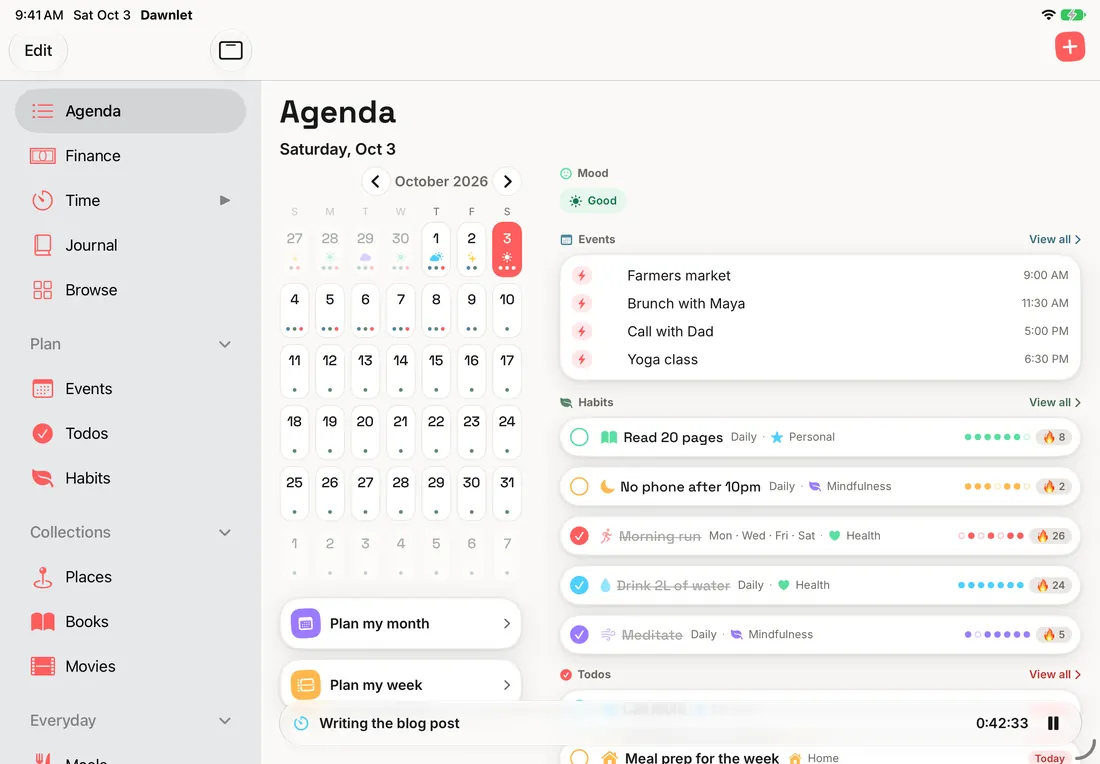
New to Dawnlet? Start with Agenda, where everything else shows up, then Habits, the one most people open every day.
Agenda
Make one screen your whole day: what to put on it, how to order it, and when Plan My Week earns its keep.
Todos & events
Repeats that bend without breaking, skipping one occurrence, and what belongs on a todo versus an event.
Habits
Pick a rhythm you'll keep, protect a streak, skip instead of abandoning a day, and earn all four habit badges.
Money
Logging that takes seconds, budgets that reset each month, and recurring payments that fill themselves in.
Time tracking
Start, pause and switch without losing a minute, from the app, the Lock Screen or your wrist.
Bucket list
Places to go, books to read and films to see, and how to keep the list moving.
People
Remember birthdays and the little things, by hand or straight from your contacts.
Meals & gratitudes
Small daily logs that add up, and the streaks and badges they quietly build.
Journal
Write little and often, find anything you wrote, and use On this day to read what you wrote before.
Notifications
Which nudges to switch on, which to leave off, and how Dawnlet plans them with the app closed.
Categories & tags
One set of colours and labels across the whole app, and how to keep it tidy.
Insights & badges
Streaks, badges, Reports, Patterns and Look Back: reading your days back to yourself.
Everywhere
Siri, Shortcuts, widgets, Control Center, the Lock Screen timer and Apple Watch.
Your data
Where it lives, how it stays private, working offline, and taking it with you.
Under the hood
How the app is put together, and how Plus is unlocked.
How to read a playbook
Each page is a short run of numbered plays: what a feature does for you, a tip for using it well, and whether it's free or Plus. Each one ends with Under the hood, a plain-language look at how that part of the app works, for anyone who wants to know why it behaves the way it does.
A note on honesty
These pages describe the app as it is today, not as it's planned to be. A feature appears here only once it's in the app. Anything still on its way is listed on the changelog instead.