1Know what's on offer
Every notification Dawnlet sends is one of 27 kinds, grouped by module in Settings › Notifications. Each has its own switch, and most have a time you can change. The tier follows one rule: anything about what's ahead of you is free, and anything that looks back over a day, week or month is Plus, like the rest of the insights. Money is the exception: its alerts are about budgets and recurring transactions, which are Plus themselves.
| Notification | When it arrives (default) | Tier |
|---|---|---|
| Daily & weekly | ||
| Morning digest on | 7:30am, the shape of your day | Free |
| Evening review | 8:30pm, what you finished and what slipped | Plus |
| Weekly recap | 7pm on the last day of your week | Plus |
| If you've been away on | After three days without opening Dawnlet | Free |
| Events | ||
| Before an event starts on | 30 minutes before (5 minutes to 2 hours) | Free |
| All-day events on | 8am, the day's all-day events | Free |
| Todos | ||
| Daily todo summary | 9am, a count of what's due and overdue | Free |
| Each todo due today | 9am, one per dated todo | Free |
| Overdue todos | 6pm, when something has slipped | Free |
| Habits | ||
| Daily habit notification | 8am, the habits due today | Free |
| Streak at risk on | 7:30pm, when a running streak is about to break | Free |
| Streak milestones | As a habit hits 7, 30, 100 days and so on | Plus |
| Coming in 1.5: for a habit you do a few times a week, the daily notification counts it while its week is still open, Streak at risk fires when the week can only be saved today, and milestones come at 4, 8, 12, 26 and 52 weeks. | ||
| Finance | ||
| Recurring transaction due on | 9am, the day it lands | Plus |
| Budget running low | 6pm, past your warning line | Plus |
| Over budget | 6pm, when a category goes over | Plus |
| Monthly money summary | 9am on the 1st, for the month just finished | Plus |
| Set this month's budgets | 10am on the 1st, if the month has none | Plus |
| Time tracking | ||
| Timer still running | After 2 hours running | Free |
| Timer left paused | After 30 minutes paused | Free |
| Daily time goal | 9pm, if today is under your goal | Plus |
| Weekly time recap | 7pm on the last day of your week | Plus |
| Bucket list | ||
| Planned for today | 9am, movies, books and places planned for today | Free |
| Mid-month check-in | 6pm on the 15th, what you planned for the month | Plus |
| People | ||
| Birthdays on | 9am on the day | Free |
| Birthdays coming up | 9am, 3 days before (1, 2, 3 or 7) | Free |
| Planning | ||
| Plan my week | 6pm the evening before a week you haven't planned | Free |
| Plan my month | 6pm on the last day, if next month isn't planned | Free |
That's 16 free and 11 Plus. Without Plus, the Plus kinds still appear in the list with a lock, so you can see what they'd add.
2Start with a few
A new install turns on just seven, marked on above: the morning digest, event notifications, all-day events, birthdays, streak at risk, the nudge if you've been away, and (with Plus) recurring transactions due. Everything else waits for you to ask, so granting permission doesn't bury you on day one.
If a notification arrives three days running and you swipe it away each time, switch it off. The ones you keep should be the ones you act on.
The per-module plays go further: see the Habits, Money and Time tracking playbooks.
3Fit them around your day
Switch a kind on and its settings appear underneath: a time for anything that arrives at a set hour, a lead time for event notifications and birthdays, how long a timer runs or sits paused before you hear about it, the warning line for budgets (50, 75, 80 or 90%), and your daily time goal.
Then set quiet hours in Settings › Notifications. They're off until you turn them on (10pm to 7am to start with) and treat notifications two ways:
| During quiet hours | Which kinds | Why |
|---|---|---|
| Held until the window ends | Digests, recaps, heads-ups and nudges | A morning digest is just as useful at 7:00 as at 6:00 |
| Dropped | Before an event starts, and the two timer notifications | A notification for an event that has already begun is worse than none |
Two limits apply on top, whatever you switch on. Dawnlet sends at most six notifications a day, dropping the least important first. And a few busy kinds have a daily cap of their own: three event notifications, two todos due, so one crowded module can't drown out the rest.
Set quiet hours to your real sleep, not a polite guess. Nothing that can wait is lost: it simply arrives when you're up.
The All notifications switch at the top silences everything at once and keeps every individual choice for when you turn it back on.
4Add the look-backs Plus
The Plus kinds are the ones that look back and tell you how it went:
- Evening review at the end of each day: what you finished, and what slipped.
- Weekly recap on the last day of your week: habits, todos and tracked time. Tap it and it opens Look Back on that week.
- Weekly time recap and Daily time goal for tracked time.
- Monthly money summary on the 1st: income, spending and net. It waits until the month is really over, so the figures are final.
- Mid-month check-in on the 15th, for the bucket-list plans you made for the month.
- Streak milestones, a note as a habit reaches 7, 14, 30, 50, 100 and 365 days.
"Your week" follows the first day of the week you've chosen for Agenda, so a Sunday-start week is recapped on Saturday.
Pair the morning digest with the evening review. One sets the day up, the other closes it, and together they're often all the reminding a day needs.
5Keep the feed
Swipe a notification away and iOS forgets it. Dawnlet doesn't. The bell in Browse (on iPad, Notifications in the sidebar) opens a feed of everything you've actually been notified about, newest first and grouped by day, including the ones that arrived while the app was closed. Tap one to go where it points; swipe to delete it.
Only what really reached you is listed. If notifications are switched off for Dawnlet in iOS Settings, the feed doesn't claim otherwise. The feed is Free and saved to your account, so it survives a reinstall.
6Choose what the Lock Screen shows
A notification shows on your Lock Screen to whoever picks up your phone, so it's worth knowing what each one says:
- The daily and weekly ones are generic. The morning digest only says it's morning and invites you in to see today, with no list in it. They repeat on a fixed schedule, so they never carry a count or a title.
- Notifications name what they're about. An event notification carries the event's title, a birthday the person's name, and Streak at risk the habit. Count-style ones, like the daily habit notification, give a number rather than names.
- Money can go quiet. Turn on Require Face ID for Finance and every money notification drops its amounts, and budget alerts drop the category names too. "Rent, $1,850 due today" becomes "A recurring transaction is due today". More in the Money playbook.
Nothing is sent through a server to reach you. Every notification is planned and scheduled on your phone from data already there, so there's no push service and no notification content in transit. What is stored is the feed: its entries, including event titles and birthday names, are saved with your account like the rest of your data.
If your phone often sits face-up on a desk, turn on the Face ID lock before the money notifications, and keep event notifications for events whose titles you're happy to have seen.
§Under the hood
Many apps only remind you if you keep opening them. Dawnlet keeps the next 14 days of notifications armed on your phone at all times, each one scheduled individually, so they keep arriving a week after you last opened the app, with no network involved.
iOS lets an app hold just 64 pending notifications and silently drops the rest, so Dawnlet shares them out:
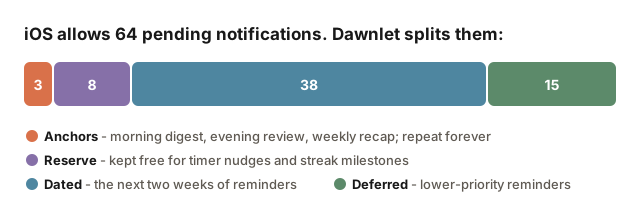
| Share | Holds | Slots |
|---|---|---|
| Anchors | The morning digest, evening review and weekly recap, set to repeat on their own | 3 |
| Reserve | Kept free for the ones your actions set off: timers, streak milestones, the away nudge | 8 |
| Dated | Event notifications, birthdays, todos due, bills due, plans for today | 38 |
| Deferred | Summaries, streak at risk, overdue nudges, planning prompts | 15 |
- Planned on the device. Each module proposes what should fire; Dawnlet drops what you've switched off (or what needs Plus without it), applies quiet hours and the daily caps, fits the rest into the slots by importance, then changes only what differs from what's already scheduled.
- A packed calendar shortens the horizon, and that's deliberate: your event notifications come before a nominal fortnight. Settings › Notifications says exactly how far ahead it's scheduled.
- The anchors are the safety net. They repeat by themselves, so even if background refresh never runs, you still get a daily nudge.
- Offline is safe. If planning can't read your data (on a plane, say), nothing already armed is touched. A kind you've switched off is still withdrawn.
- Your settings follow you. Switches, times and quiet hours are kept on the phone for planning in the background and synced with your account for your other devices.