Your day, gently organized.
Events, todos, habits, money, time, and the small things you want to remember — one calm app instead of five cluttered ones. Dawnlet shows you a single day at a time, and stays quiet the rest of the time.
one screen, the whole day
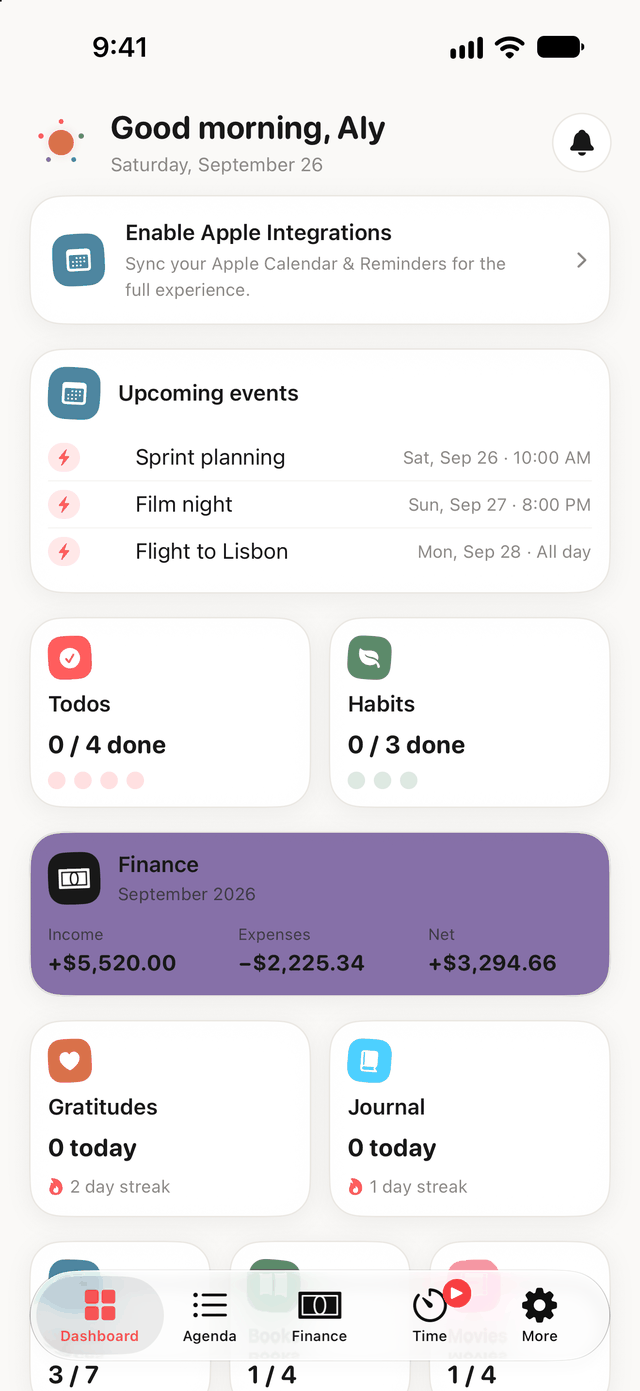
A day is one thing. Most apps make it five.
Your calendar knows about your meetings. A separate app knows about your habits. Another one knows what you spent. None of them know what your Tuesday actually looks like. Dawnlet keeps all of it in one place and renders it as a day.
One app, three screens
The same day, sized for whatever you happen to be holding. Everything syncs through your own account, so what you tick off in one place is already done in the others.
iPhone
The whole app, one day at a time, plus Home Screen widgets for today's todos, your habits, the running timer and what's next.
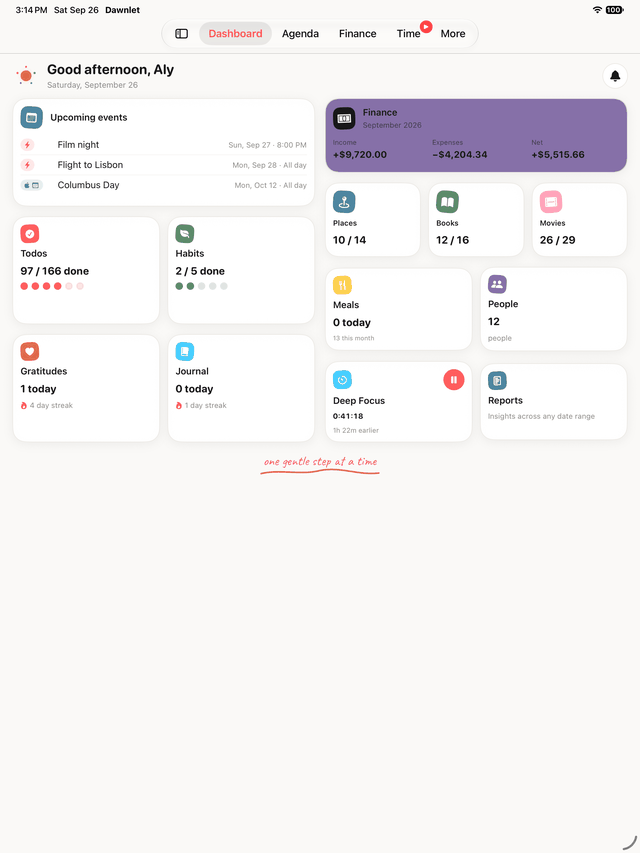
iPad
Not a stretched phone app. A sidebar instead of a tab bar, the Dashboard in two columns, and list rows that use the width rather than leaving it blank down the middle.
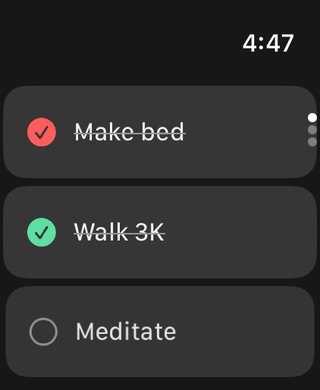
Apple Watch
Tick today's habits and todos off from your wrist, and start, pause or stop the timer without reaching for your phone. Set it up once from your iPhone and it works on its own after that, wherever you are.
A complication tells you how much of today is done — a count, and nothing else. No task title, no habit name. A watch face is visible to whoever is standing next to you, so the things you are trying to remember stay inside the app, where you have to look on purpose.
Eleven modules, one day
Every module shares the same categories, the same tags, and the same day. Each one also has a home screen of its own for when you want the whole list.
Events
One-off and recurring events, timed or all-day, with locations and notes. Recurring ones generate occurrences you can skip individually without touching the series.
Todos
One-off todos with due dates, plus repeating ones on weekly, monthly or nth-weekday schedules. Skip an occurrence and the schedule carries on; overdue items say so.
Habits
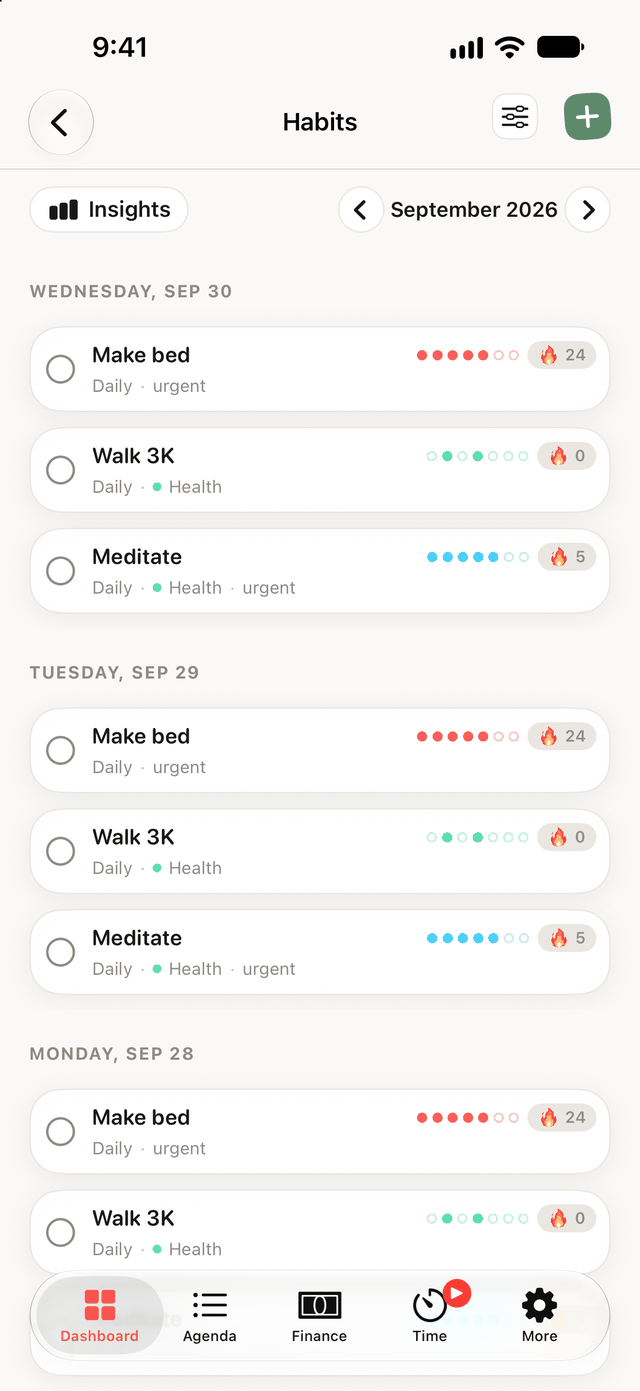
Every-day or specific-weekday habits with a week strip and a live streak. Streaks are computed from an append-only log of days, never stored — so fixing a day fixes the streak.
Money
Income and expenses by category, a stacked breakdown of each, per-month budgets with no surprise rollover, and recurring transactions that generate the month's bills for you.
Time tracking
A live timer with real pause segments, one-tap switching between activities, a day's sessions you can edit after the fact, and a week chart.
Bucket list
Movies to watch, books to read, places to go — each with a planned date, a rating when you're done, and who you did it with, pulled from your Contacts.
People
The people in your life, with birthdays that turn into reminders and an optional one-way sync from Apple Contacts.
Meals & gratitudes
Two deliberately tiny modules: what you ate and how it was, and a line or two about what went right. Both are logged straight from the day itself.
Notifications
27 kinds across every module, each one toggleable, all generated on your device — plus a feed of what you were actually notified about.
Categories & tags
One set of categories and tags across the whole app. A category picks its own colour and icon and declares which modules it applies to; tags are plain cross-module labels.
Guided planning
Plan My Week and Plan My Month: short guided passes that walk you through the days ahead instead of leaving you staring at an empty grid.
Journal
As many entries a day as you like, each with a date and time you set yourself — a log, not one page a day. Bold and italic, an optional mood, a category and tags.
Five screens, and what they're for
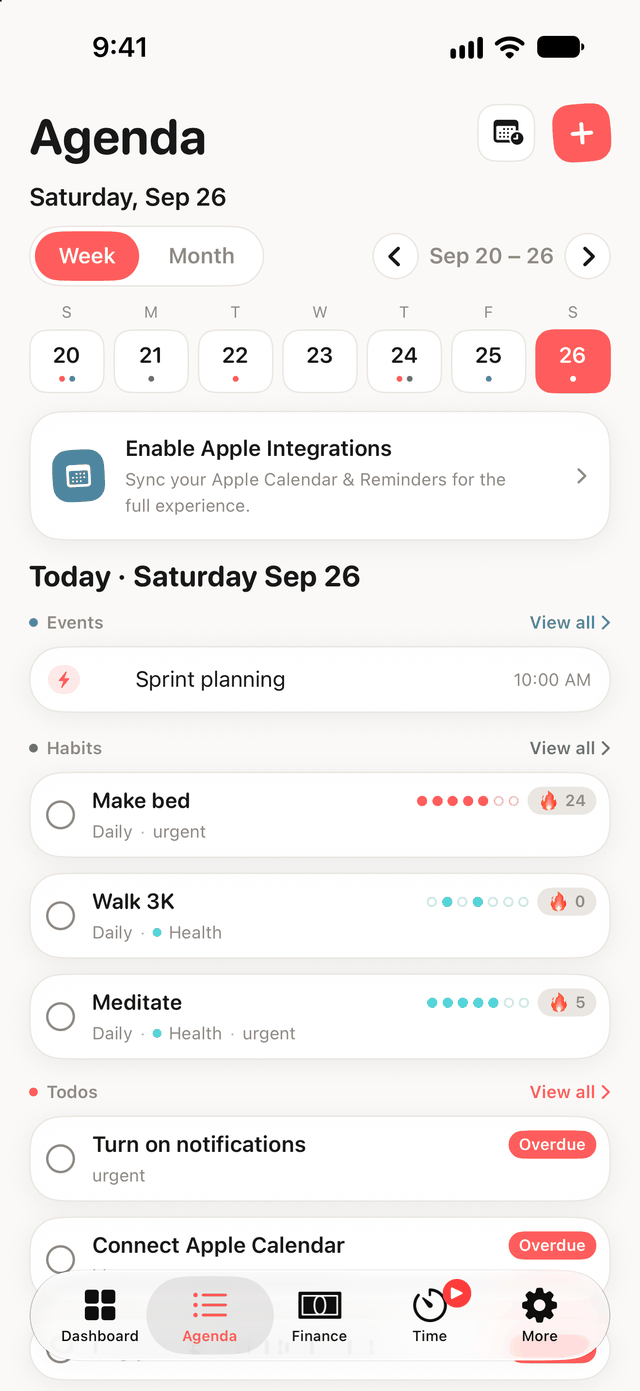
One day, module by module
A paged week or month grid on top, and below it the selected day broken into one section per module — what's due or planned, and what you already finished.
- Sections you can reorder or hide, so your day reads in your order
- The same row components the module screens use, swipes included
- Tap to check something off; swipe to skip a recurring occurrence
- Meals and gratitudes are logged here and nowhere else
Streaks you can trust
Dawnlet stores the days you did a habit, not a number it increments. Every streak, week strip and percentage is derived from that log, so correcting a day in the past corrects everything downstream.
- Every day, or specific weekdays
- Skip a day on purpose without breaking the chain
- A reminder in the evening when a streak is genuinely at risk
- Milestone notifications at 7, 14, 30, 50, 100 and 365 days
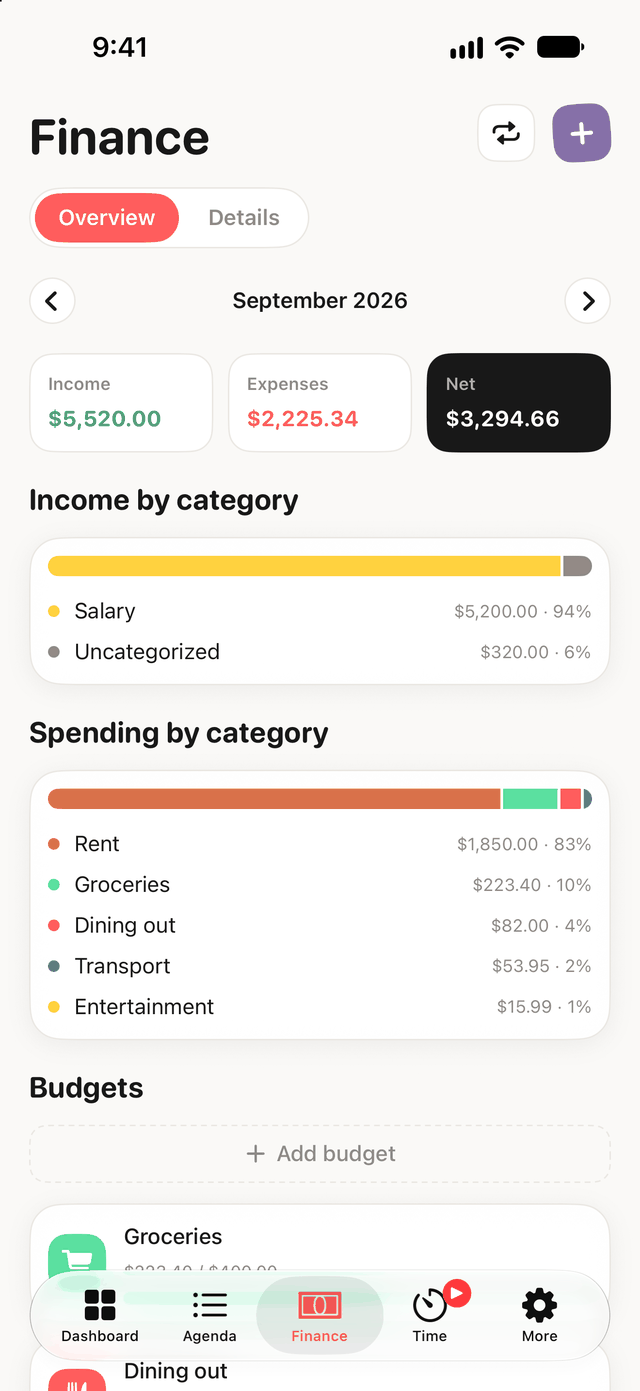
Where the month actually went
Income and expense totals, a stacked bar per category for each, and this month's budgets underneath. Budgets are per calendar month with no rollover, so editing one month never quietly rewrites another.
- Recurring transactions generate each month's bills, skippable one at a time
- Category filters and date-grouped transaction history
- Optional Face ID lock — and amounts stay out of notification text when it's on
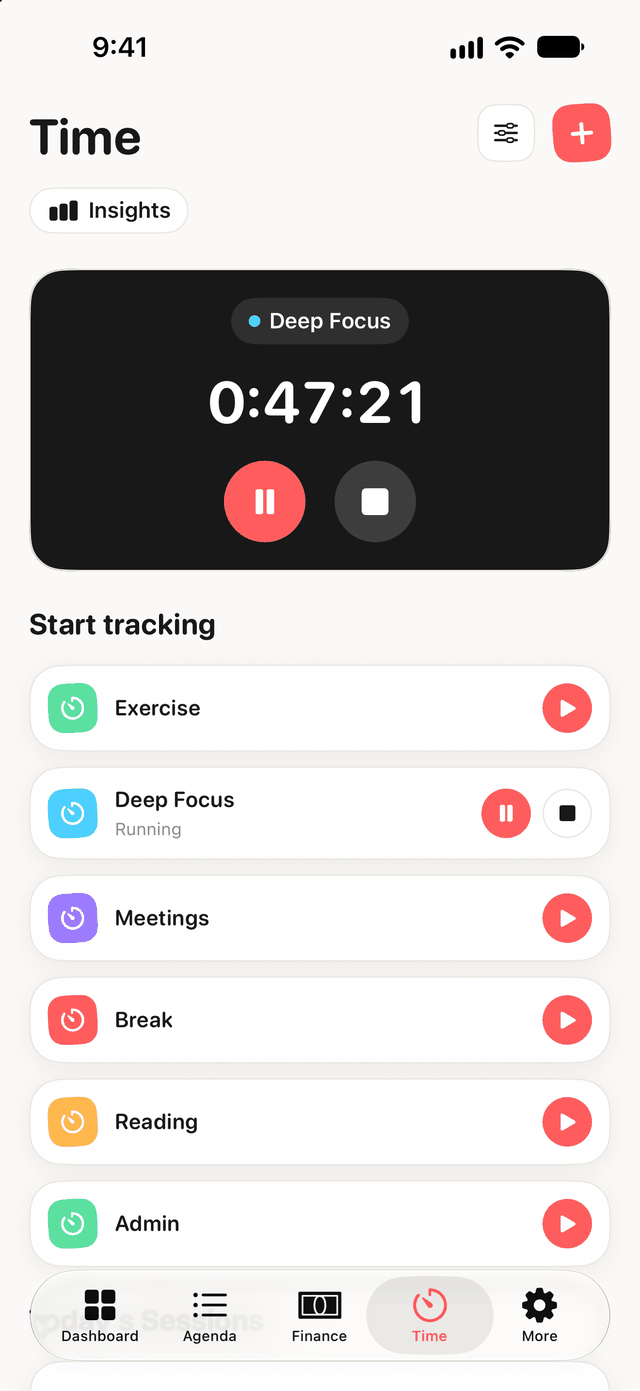
A timer that survives a pause
Start an activity, pause it, switch to another one — Dawnlet tracks real segments rather than a single start time, so the elapsed total stays honest across every interruption.
- Switching activities stops the running one atomically
- Edit or backdate a session after the fact
- Today and week totals, and a seven-bar week chart
- A nudge when a timer has been running — or paused — too long
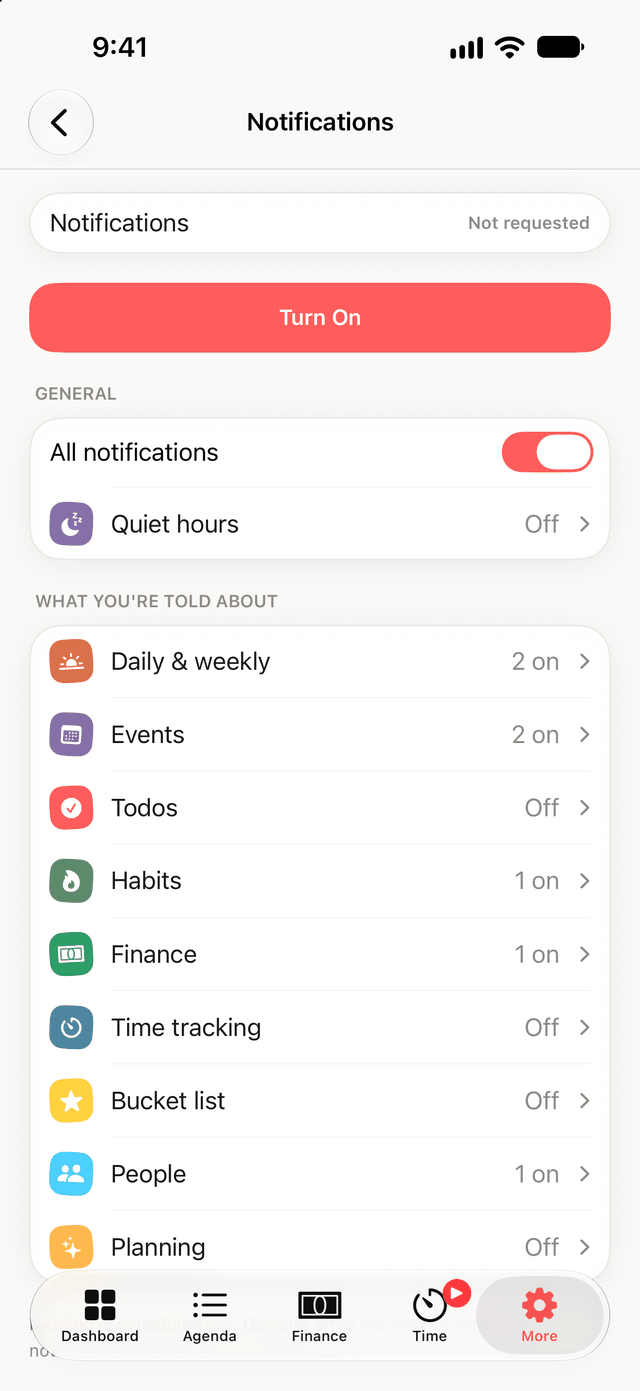
Reminders that keep working when you don't open the app
Dawnlet arms two weeks of real reminders at a time instead of just the next one, so closing the app for a week doesn't make it go silent. Everything is computed on the device — there is no push server in this app.
- 27 kinds across every module, each one individually toggleable
- Quiet hours that shift gentle reminders and drop time-critical ones
- A feed of what you were actually notified about, reconstructed even for notifications that fired while the app was closed
- Money amounts are redacted from the text when the Face ID lock is on
Dawnlet isn't interested in who you are
You sign in with Apple. Dawnlet keeps an account ID, the email Apple hands over, and your name if you share it — so it can greet you. That's the whole list, and none of it goes to anyone.
Every one of Dawnlet's 27 notification kinds is computed on your device from your own data. There's no notification server, so nothing about what you're being reminded of is ever sent anywhere to deliver it.
Free to use, Plus when you want it
Dawnlet Plus is one subscription with two plans, handled entirely by Apple. Start with 14 days free, pick monthly or yearly, and switch or cancel whenever you like — there's still no server-side account tier, and nothing in Dawnlet's database knows you pay.
$0
- Every module, in full — up to 500 items each
- Log anything and read back every day you ever recorded
- Money: transactions, your month's totals, Face ID lock
- Journal with search, meals, gratitudes, people, categories and tags
- Apple Calendar and Reminders, read into your agenda
- Every reminder, digest and birthday, and the whole notification feed
$3.99 / month
$34.99 / year — about $2.92 a month, saving 27%
- Month insights on every module, and no item cap
- Reports across any date range, with PDF export
- Your data exported as CSV or JSON
- Anything that repeats — todos, events and bills — plus budgets
- Journal "on this day", Apple Calendar two-way and Contacts sync
- Weekly recaps, evening review, streak milestones, time-goal reminders
The present is free. Looking back is Plus. Capturing your day — all of it, in every module, including your money — costs nothing, and so does reading back every day and month you ever recorded. What Plus buys is the layer that only exists because you kept using the app: month insights, reports over any range, export, and the automation that repeats things for you. Reminders are table stakes, so they're free, and the notification feed is never paywalled. Both plans are the same subscription, so moving from monthly to yearly is an upgrade rather than a second purchase.
Reasonable things to ask
Is Dawnlet available yet?
Not yet. It's in active development, working towards a 1.0 release. This site goes up ahead of the App Store release.
Do I need an account?
Yes, via Sign in with Apple. Your data syncs against an internal account ID so it survives reinstalling the app and moving to a new phone. Dawnlet stores the email Apple provides and, if you share it, your name — nothing else about you, and none of it for marketing.
Is there an Android or web version?
Not today. Dawnlet is a native iOS app. A web client is planned but hasn't been started.
Does it work offline?
Notifications do — they're scheduled on the device up to two weeks ahead and keep firing with no network and the app closed. Your data itself syncs through Dawnlet's backend, so creating and editing needs a connection.
Is there a free trial?
Yes — 14 days, on either plan. The trial belongs to the subscription as a whole, so you get it once whether you start monthly or yearly. Nothing is charged until it ends, and you can cancel during it.
Can I cancel, or switch between monthly and yearly?
Both, from Settings on your iPhone — Apple handles billing, so Dawnlet never sees a card. Monthly and yearly are two plans of one subscription: switching up to yearly takes effect immediately with the remainder of the month credited, and switching down to monthly waits until the year you've already paid for is over. Cancel and Plus stays on until the period you paid for runs out, then the app quietly falls back to the free tier — your data and your settings stay exactly where they were.
What happens to my data if I stop using Dawnlet?
You can delete your entire account from inside the app. That removes the account and everything attached to it — not a soft delete.
Dawnlet is nearly here
Curious about how any of it is built? The technical write-ups go module by module. Want to be told when it ships? Say so.