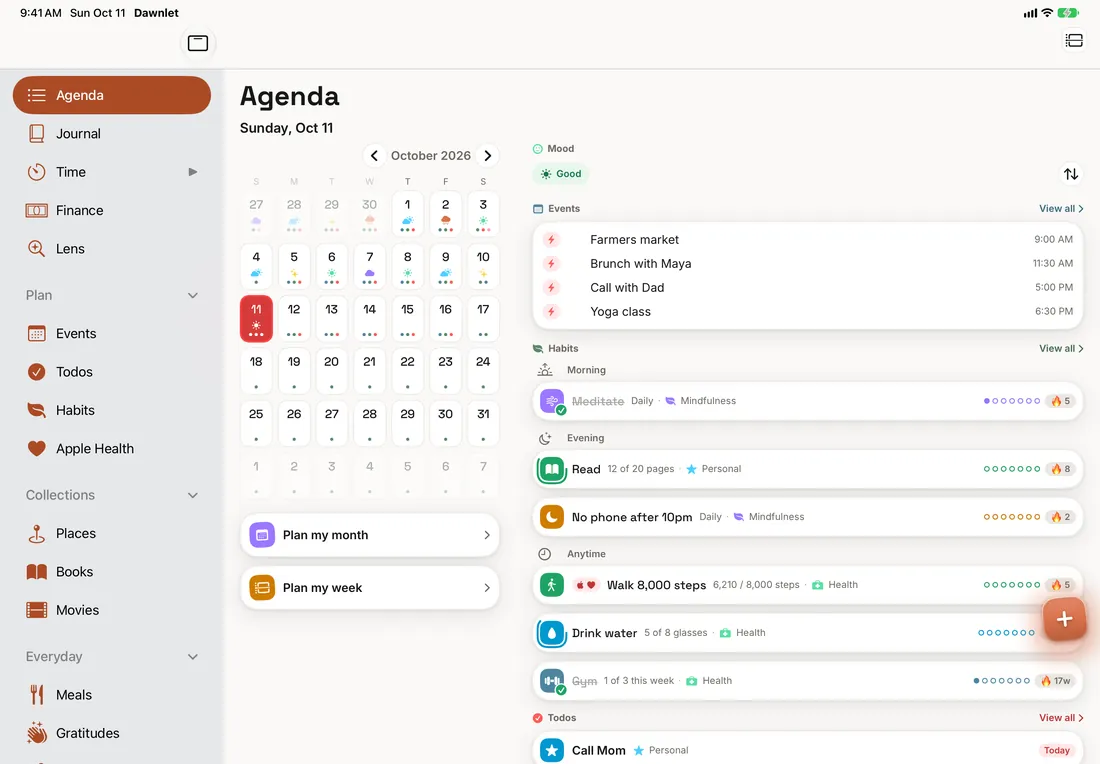
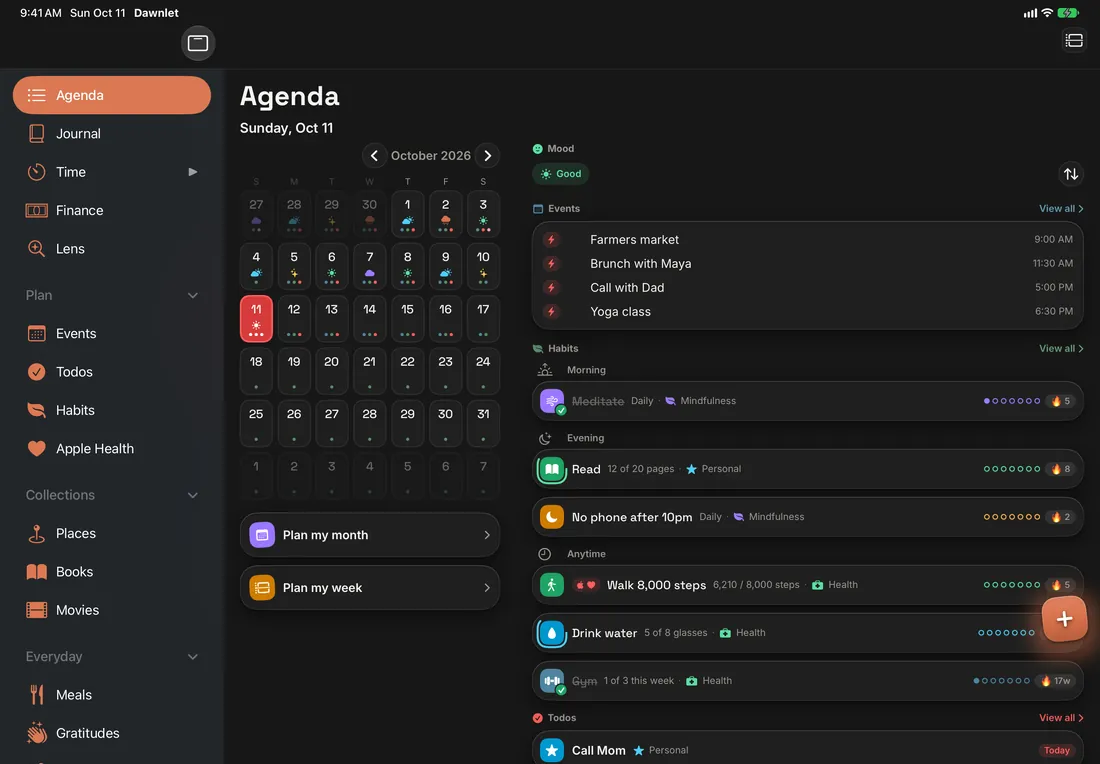
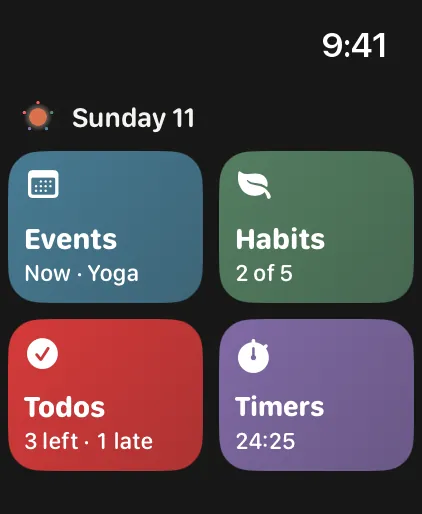
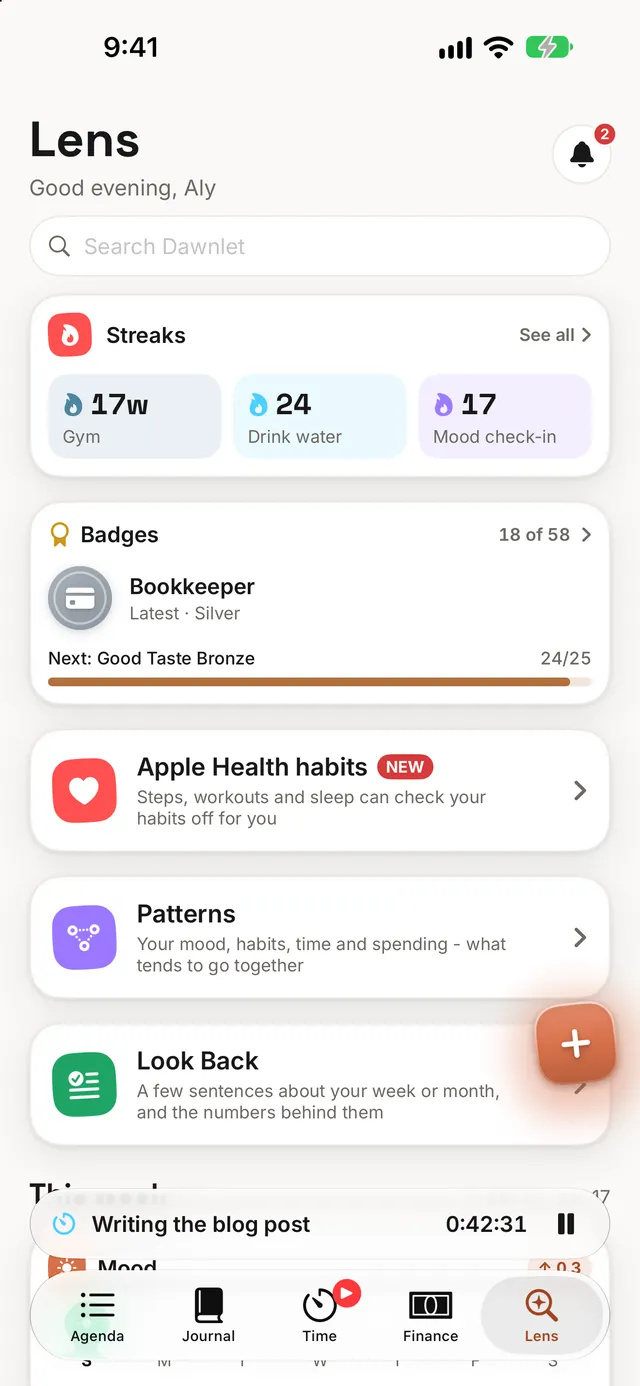
For iPhone, iPad and Apple Watch, in light and dark
TuesdayOct 14Today
$57spent this week
6h 20mtracked
Tuesday
Today · Oct 14
9:41
The tour
Two minutes to knowing your way around.
The same tour the app gives you on its first launch: zoom out to the month,
narrow to the week, land on a day — then what adds up from living in it for a while.
Step 1 of 7
00:24:15Deep focus
82%↑Habits
9↑Todos
$57↓Spent
6h 20m↑Tracked
AgendaJournalTimeFinanceLens
The shape of it
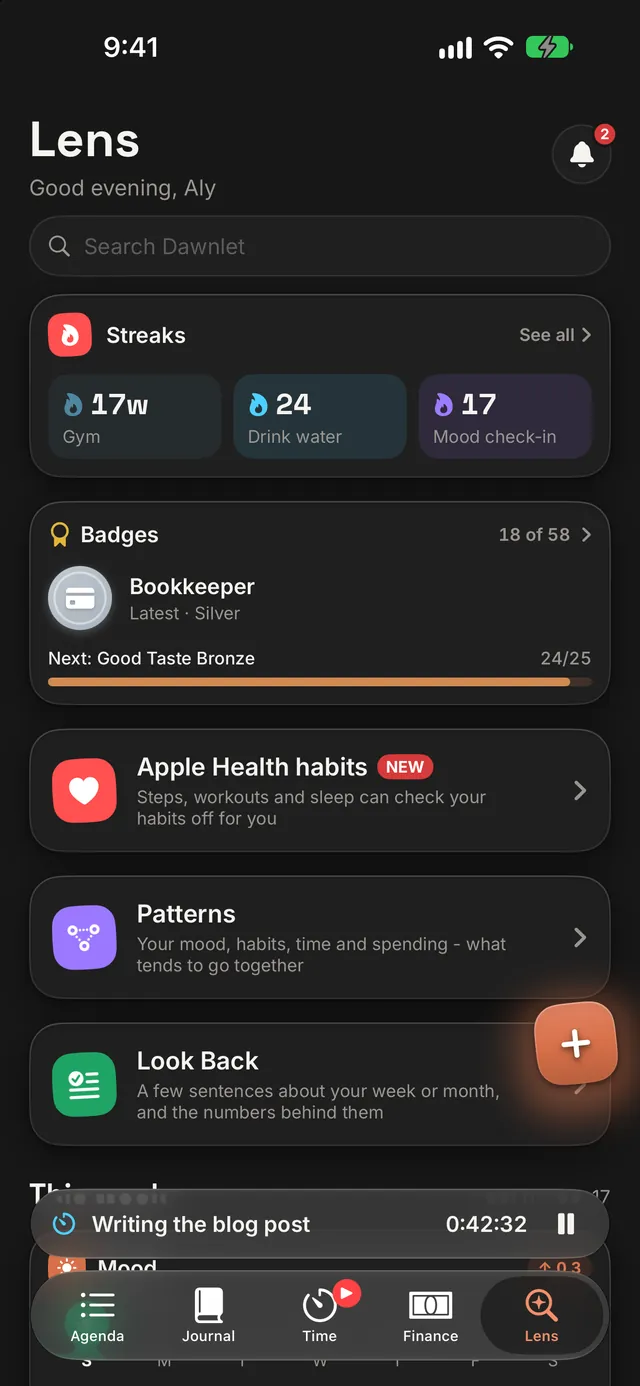
Five tabs, one day.
Agenda for the day itself, Journal for your mood and reflecting on it, Time
and Finance for the two modules you open most, and Lens for how the week is going, with search at the top.
Every other module, and Settings, wait behind the left edge - swipe in from it. Nothing is
buried more than two taps deep.
Agenda — the week or month grid, and the day underneath
Swipe in from the left edge — every module is behind it, in your order
Search — at the top of Lens, for people, todos, events, habits, settings and more
Plan My Month walks you through the month ahead instead of leaving you
staring at an empty grid: what's already fixed, what you want to get to, and what it should cost.
Events, timed or all-day, one-off or repeating
Trips and books span days, so day 3 of 8 says so
Budgets are per calendar month, with no surprise rollover
Dawnlet stores the days you did a habit, not a number it increments. Every
streak and percentage is derived from that log — so fixing a day in the past fixes everything
downstream.
Month insights on every module screen Plus
Reports across any range you pick, exportable as PDF Plus
Your data out as CSV or JSON, whenever you want it Plus
Every notification is computed on your device from your own data, two weeks
ahead at a time. Close the app for a week and it keeps working — there is no notification
server in this app.
35 kinds across every module, each one toggleable
Quiet hours shift the gentle ones and drop the urgent ones
The same day, sized for whatever you happen to be holding - in light or
dark, upright or sideways. Everything syncs through your own account, so what you tick off in
one place is already done in the others.
Light
Dark
Light or dark, it's yours
Every screen is drawn for both. Follow your device's setting, or pick one
in Settings.
Portrait
Landscape
Any way you hold it
On iPad, screens split into two columns whenever the window is wide enough - in portrait,
in landscape, or side by side with another app.
Not a stretched phone app
A sidebar listing every module instead of a tab bar, Lens in two columns, and list rows that use the
width rather than leaving it blank down the middle.
The whole app, a day at a time
Every module, plus Home Screen widgets for today's todos, your habits, the running timer
and what's next.
Apple Watch, on its own
Tick off today's habits and todos, and run the timer without reaching for your phone — even
with no signal. Its complications show a count and nothing else — no titles on a face
others can see.
LensThe week so far
Plan My WeekSeven days, one at a time
HabitsStreaks from a log of days
FinanceWhere the month went
TimeA timer that survives a pause
ReportsAny range, as a PDF
What's inside
Eleven modules, one day.
Events, todos, habits, money, time, journal and more, all sharing the same
categories, tags and day, and what's free and what's Plus in each.
Dawnlet Plus is one subscription with two plans, handled entirely by Apple.
Start with 14 days free, and switch or cancel whenever you like — Dawnlet never sees your payment details.
Free
$0
Everything you need to run the day.
Every module — up to 500 habits, todos, activities, places, books and movies each, everything else unlimited
Log anything and read back every day you ever recorded
Money: transactions, your month's totals, Face ID lock
Journal with search, meals, gratitudes, people, categories and tags
Apple Calendar and Reminders, read into your agenda
Works with no signal: what you add, tick off or change waits on your device and syncs when you're back
21 of the 35 notification kinds — todo, habit and event notifications, digests, birthdays — and the whole notification feed
Dawnlet Plus 14 days free
$3.99 / month
or $34.99 a year — about $2.92 a month, saving 27%
Month insights on every module, and no 500-item cap
Reports across any date range - every module, or just one from its insights - with PDF export
Plan My Week, with each day's events beside it, and Plan My Month
A day timeline: your events and tracked time, hour by hour
Your data exported as CSV or JSON
Anything that repeats — todos, events and bills — plus budgets, repeated from last month in one tap
Journal "on this day", adding events to Apple Calendar, and what you've done together with each person, with a nudge to keep in touch
The other 13 notification kinds: recaps, evening review, streak milestones, time goals, budget and bill alerts
Chat with Dawnlet, weather on Agenda and for your trips, journal prompts from your day, and sleep beside your moods
The present is free. Looking back is Plus. Capturing your
day — all of it, in every module, including your money — costs nothing, and so does reading back
every day you ever recorded. Plus is the layer that only exists because you kept using the app:
insights, reports, export, and the automation that repeats things for you. Notifications about what's
ahead are table stakes, so they're free — except the budget and bill alerts, which only exist once
you have Plus's budgets and repeating bills.
Reviews
What people say so far.
Dawnlet has been on the App Store since October 1, 2026.
Here's what people have written there so far, word for word.
Love this app
Simply, I loved Dawnlet once I installed it and started using it. Very well done.
Karimster1, App Store review, October 4, 2026
Great App!
Really impressed with Dawnlet so far! It’s nice having everything I need in one app — from planning my day and keeping up with tasks to managing my money. The expense tracker and custom budget categories are especially useful, and I love being able to see a clear overview of my spending. The reminders are super handy too, and the little achievement badges make staying on top of things more enjoyable. Such a useful app to have!
AussieGirl000, App Store review (Australia), October 4, 2026
Impressed
Really impressed with Dawnlet so far! The finance tools are a standout, especially the custom categories and spending breakdowns. I also love having planning, habits, goals, books and movies together. The achievements are a fun touch too. Great start for a new app!
Nickname_Nickname000, App Store review, October 5, 2026
Todoist and Notion are both very good at what they do. Dawnlet does something
different: one person's whole day - plans, habits, money, time and journal - ready the moment you open it.
Dawnlet vs Todoist
Todoist is a task manager. Dawnlet puts your todos next to the rest of your day.
Yes. Dawnlet is on the App Store for iPhone, iPad
and Apple Watch, and the changelog lists what's in each version
and what's coming next.
Do I need an account?
Yes, via Sign in with Apple. Your data syncs against an internal account ID so it survives
reinstalling the app and moving to a new phone. Dawnlet stores the email Apple provides and, if
you share it, your name — nothing else about you, and none of it for marketing.
Is there an Android or web version?
Not today. Dawnlet is a native iOS app. A web client is planned but hasn't been started.
Does it work offline?
Yes. Open Dawnlet with no connection and your agenda, habits, todos,
events and Lens show what was there last time, from a protected copy kept on your device, with a
small banner saying you're offline, and notifications keep firing because they're scheduled on
the device up to two weeks ahead. It works for changing too: almost anything
you add, tick off, edit or delete with no signal is kept on your device and syncs in order when
you're back - the timer included, on iPhone and Apple Watch - and if another device changed the
same thing first, yours waits for you to look at rather than being lost. A few things still need
a connection, such as setting up something that repeats.
Is there a free trial?
Yes — 14 days, on either plan. The trial belongs to the subscription as a whole, so you get it
once whether you start monthly or yearly. Nothing is charged until it ends, and you can cancel
during it.
Can I cancel, or switch between monthly and yearly?
Both, from Settings on your iPhone — Apple handles billing, so Dawnlet never sees a card.
Switching up to yearly takes effect immediately with the remainder of the month credited, and
switching down to monthly waits until the year you've already paid for is over. Cancel and Plus
stays on until the period you paid for runs out, then the app quietly falls back to the free
tier — your data and your settings stay exactly where they were.
What happens to my data if I stop using Dawnlet?
You can delete your entire account from inside the app. That removes the account and
everything attached to it — not a soft delete.
Your first three moves
Start with today.
That's the whole tour. Once you've downloaded Dawnlet, three
things make the first week feel like yours:
Set up a few categories — they colour the whole app
Add three habits. Three, not thirteen
Run Plan My Week from the calendar button beside Agenda's +